
ECU Thermal Fix
499,00 złapprox. 114,23 €
The EUR amount is an estimate (NBP average rate dated 2026-10-22; 1 EUR = 4.3685 PLN). Your order and payment are in PLN. The final EUR amount depends on your bank or card provider's exchange rate and any fees.
ECU Thermal Fix is professional software for automotive workshops, designed to optimize engine cooling strategies in supported ECU software. Depending on the ECU and cooling system, it enables faster engine warm-up or adjusts the target coolant temperature to approximately 95°C.
Supported ECU families:
- VAG: Bosch EDC17C46, EDC17CP04, EDC17CP14, EDC17CP20; Continental SIMOS19.
- Opel / Vauxhall / General Motors: Delco E39, E39A, E78, E80, E82, E83, E92, E98 / E98A.
- BMW: Bosch MG1CS003.
Compatibility depends on the ECU software version. Available functions vary by ECU family.
Includes Astra J / Insignia A instrument cluster temperature coding with compatible OP-COM, J2534, AT/ST or modified ELM327 SW-CAN interfaces.
Free support included.
- Satisfaction Guaranteed
- No Hassle Refunds
- Secure Payments
Description
ECU Thermal Fix — take control of engine cooling calibration
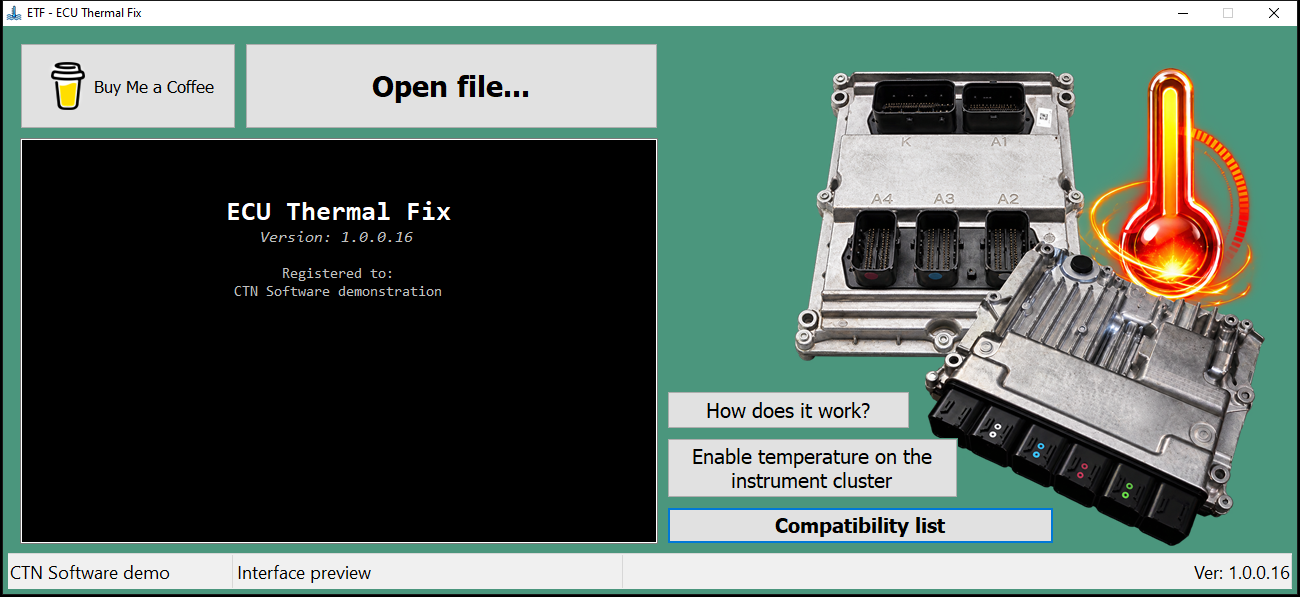
ECU Thermal Fix (ETF) is Windows software for automotive workshops and ECU tuners. It modifies supported ECU files to improve engine warm-up or reduce the target coolant temperature, depending on the cooling system. It also enables the coolant temperature display on supported Opel Astra J and Insignia A instrument clusters.
Adjust supported engine cooling calibrations from a BIN file, or connect a compatible SW-CAN interface to activate the instrument cluster temperature display.
How ECU Thermal Fix works
The following explanation comes from the application’s built-in How does it work? guide.
VAG EDC17: help the engine warm up sooner
In supported VAG engines with EDC17, ETF changes control of the electric EGR circuit pump to limit heat removal during warm-up and help the engine reach operating temperature. These systems use mechanical thermostats, which must be in good working order.
Our observations indicate that stock software can substantially prolong warm-up even with working thermostats. We see this particularly often with EDC17C46. The effect depends on ambient temperature, engine load and cabin heating.
Electronically controlled thermostat: a lower coolant temperature target
In other supported systems, the engine ECU influences thermostat operation. Stock strategies may target around 105–110°C under certain conditions. ETF adjusts the relevant calibrations toward approximately 95°C, according to the profile for that ECU software.
The aim is to reduce thermal stress on seals, plastic connections and coolant fittings. The operating temperature still varies with conditions; ETF applies the calibration intended for the supported software profile.
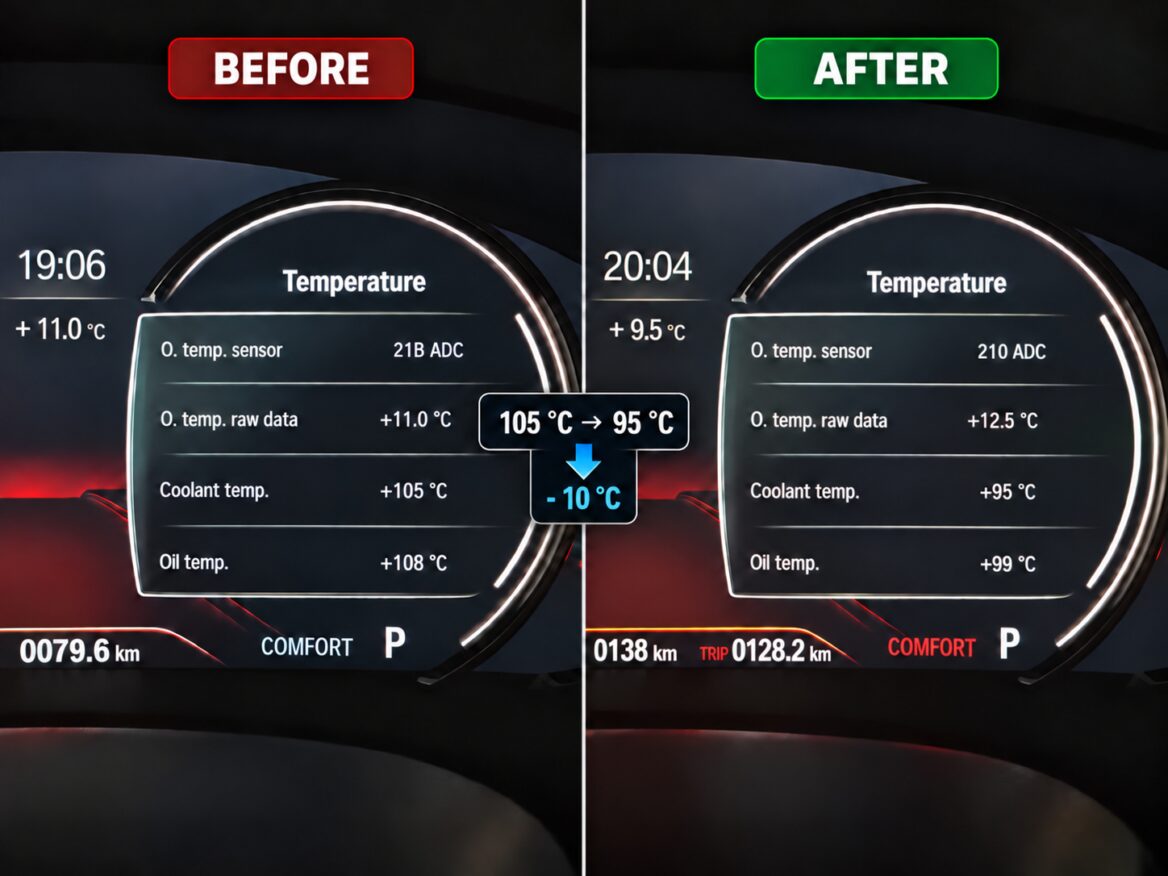
Real example: BMW 530i G Series
The supplied before-and-after comparison from a BMW 530i G Series shows coolant readings of 105°C before and 95°C after, with oil readings of 108°C and 99°C. The readings are shown in the supplied vehicle photographs.
The readings were recorded at different times and operating conditions.
Enable coolant temperature on Astra J and Insignia A
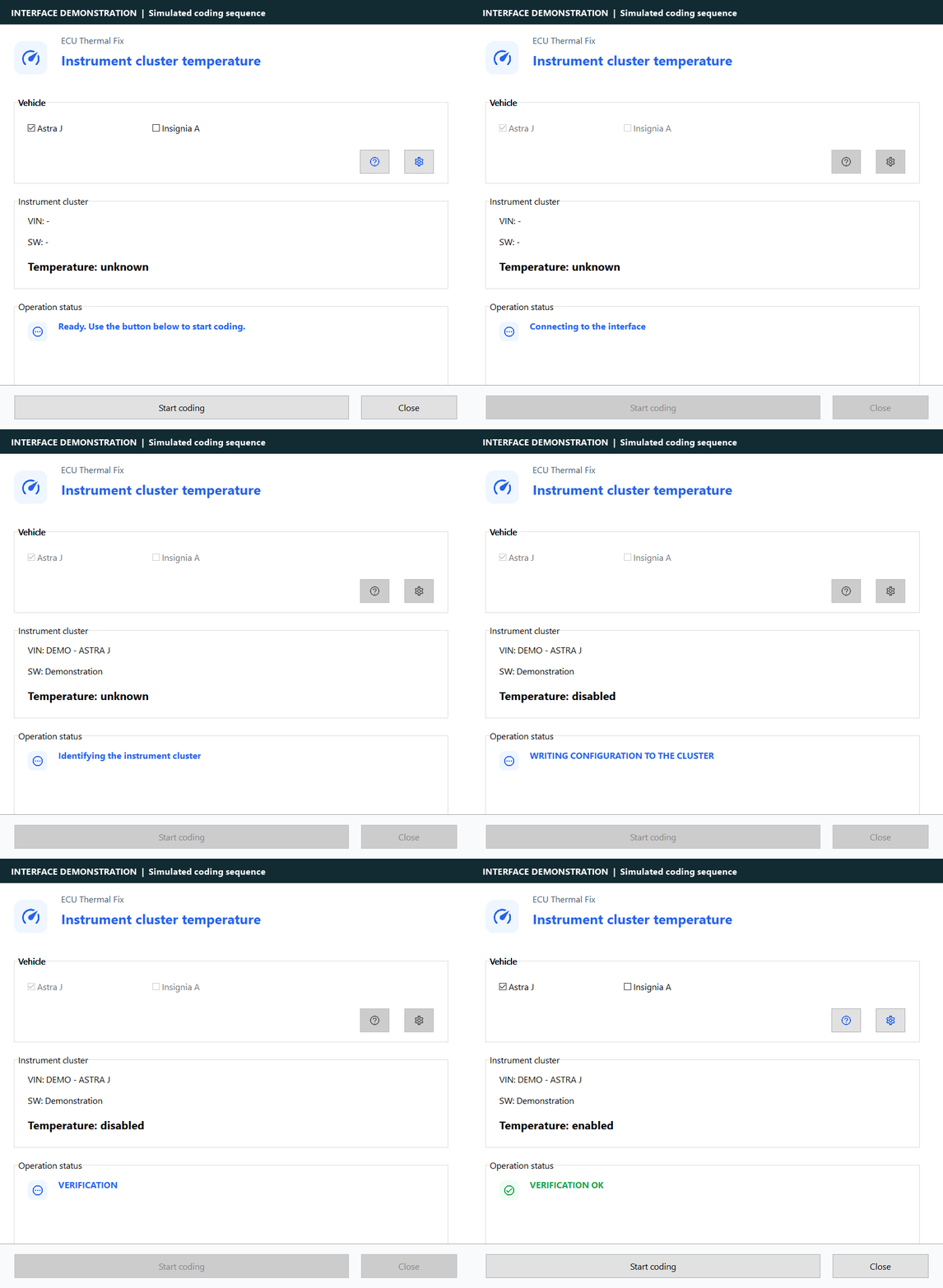
ETF includes a dedicated instrument cluster temperature coding window. Select Astra J or Insignia A, configure your interface, then start coding with a separate button. The application identifies the cluster, reads its configuration, applies the supported change and verifies the result by reading it back.
See the workflow below: connection, cluster identification, reading, writing and verification. The GIF uses the real English ETF interface with simulated connection data to demonstrate the steps.
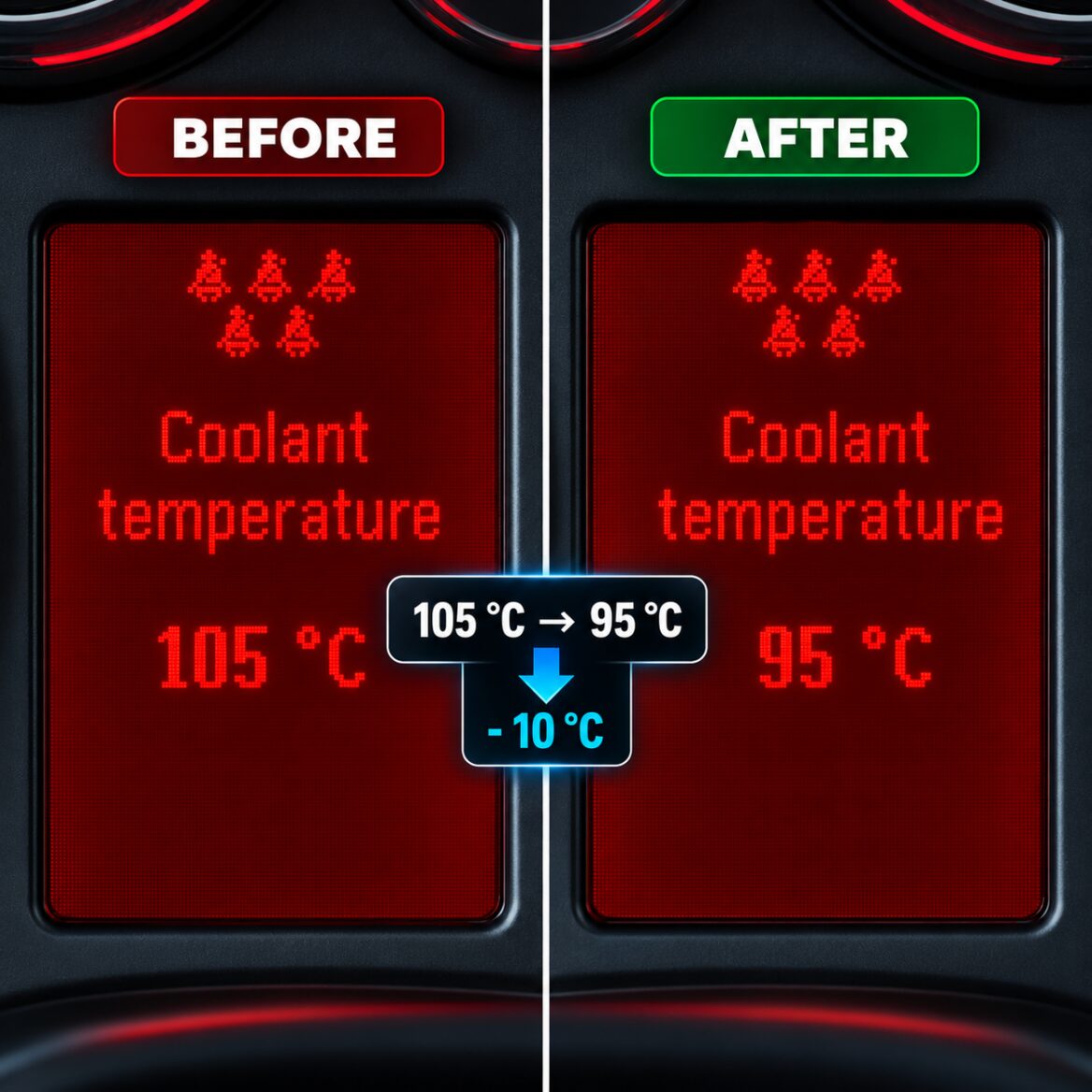
The supplied Astra J comparison illustrates coolant readings of 105°C and 95°C. Activating the numerical temperature display is separate from modifying the engine ECU cooling calibration.
Supported interfaces for cluster coding
| Interface | Connection and requirements |
|---|---|
| OP-COM | USB; compatible hardware with physical SW-CAN support. ETF detects firmware and offers the supported update when required. |
| PassThru / J2534 | A compatible device and driver that expose the required SW-CAN channel. |
| AT/ST interfaces | Supported serial COM or Bluetooth adapters with the necessary SW-CAN hardware, including compatible OBDLink/vLinker configurations. |
| Modified ELM327 SW-CAN | Serial COM or Bluetooth, with the required SW-CAN modification and wiring adapter. The adapter diagram is included in ETF. |
Physical SW-CAN support matters. A standard CAN or ELM327 label alone does not confirm that an interface can communicate with the Astra J/Insignia A cluster. The interface and any required adapter are supplied separately.
Supported ECU families
| Vehicle group | ECU families in the ETF catalogue |
|---|---|
| Volkswagen, Audi, SEAT, Škoda | Bosch EDC17C46, EDC17CP04, EDC17CP14, EDC17CP20; Continental SIMOS19. |
| Opel / Vauxhall / General Motors | Delco E39, E39A, E78, E80, E82, E83, E92, E98 / E98A. |
| BMW | Bosch MG1CS003. |
Open your ECU file to check the available calibration. For a software version that needs support, use the application’s support request or contact CTN Software.
A straightforward workshop workflow
- Read the original ECU file with your ECU programming tool.
- Open the BIN file in ECU Thermal Fix.
- Let ETF identify the ECU and check the available calibration.
- Apply the supported modification and save the output file.
- Write the result using your ECU programming tool and follow that tool’s checksum and programming procedure.
For instrument cluster coding, connect the required SW-CAN interface instead and use the dedicated temperature display window. ETF does not replace your ECU read/write programmer.
Developed and tested by CTN Software
ETF is developed and tested against supported ECU files and verified reference results. The application checks for a matching calibration before applying changes. Cluster coding includes read-back verification, and official Windows releases are digitally signed by CTN Software.
You can inspect the real application screenshots, the coding demonstration and the supplied vehicle examples on this page. Technical support is available if you need help with compatibility or activation.
License, activation and requirements
- License: perpetual license for one computer, for personal or professional use by the license holder.
- Platform: Windows PC with an internet connection for activation, license verification and online functions.
- Activation: enter the email associated with your license and confirm the code sent by email. Check the spam folder if the message is missing.
- ECU file work: a suitable ECU read/write tool and the original supported file are required.
- Cluster coding: a supported SW-CAN interface and the required wiring/adapter.
- Delivery: digital software; no interface or other hardware is included.
A healthy cooling system remains essential: software calibration does not repair a faulty thermostat, pump or coolant leak.
Save 15% with the OPF + ETF software bundle
Buy Oil Pressure Fix and ECU Thermal Fix together and receive an automatic 15% discount on both products. No coupon code is needed and the bundle has no expiry date.
At the regular price of 499 PLN each: 998 PLN → 848.30 PLN. Your saving is 149.70 PLN. The discount applies to OPF and ETF in the same cart.
Frequently asked questions
Does ETF lower the temperature in every engine?
The function depends on the cooling system. Supported VAG EDC17 applications focus on warm-up control; supported electronically controlled thermostat applications use the corresponding lower target calibration.
Can ETF show coolant temperature on my Astra J?
ETF has a dedicated Astra J/Insignia A cluster coding function. You need a supported cluster and an interface with physical SW-CAN capability.
Do I need an interface to modify an ECU BIN file?
ETF works on a file already read from the ECU. Your ECU programmer handles reading and writing. The SW-CAN interface is used for the separate instrument cluster coding function.
Is this a subscription?
No. The product is a perpetual license for one computer. Activation and online functions require an internet connection.
Compatibility questions? Talk to CTN Software
Email support@ctnsoftware.com or contact us on WhatsApp: +48 513 109 304. Include your ECU family and software number when asking about a file.
Terms and Conditions · Privacy Policy · Return and Refund Policy · Delivery Terms
You must be logged in to post a review.
Reviews
There are no reviews yet.